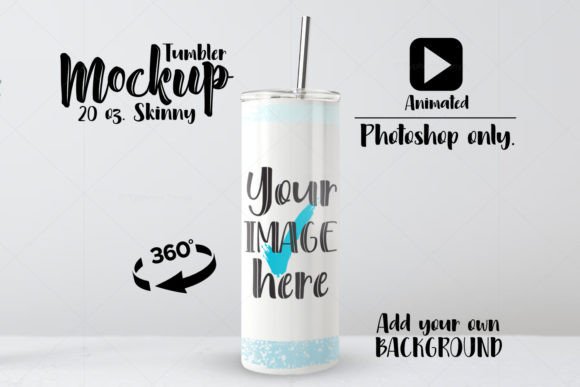
Bring Your Designs to Life with an Animated 20oz Skinny Tumbler Mockup
In the world of print-on-demand and custom merchandise, static images often fail to capture the attention they deserve. You might have a stunning graphic for a 20oz skinny tumbler, but when it sits flat on a white background in a product listing, it can feel lifeless. This is where an Animated 20oz Skinny Tumbler Mockup changes the game. Unlike traditional templates that rely on complex 3D rendering engines, this specific resource offers a streamlined, future-proof solution for creators who want their products to stand out on social media feeds and online stores without the technical headache.
At its core, this tool is a specialized Photoshop file designed to turn your flat design into a rotating video presentation. The package typically includes a single PSD file with high-resolution dimensions, usually around 2500 px by 1736 px, ensuring crisp quality even on retina displays. What makes this particular mockup unique is its construction. It does not rely on the deprecated 3D features within Photoshop, which Adobe has been phasing out. Instead, it uses smart object layers and frame animation techniques that are stable, reliable, and compatible with current and future versions of the software. This means you aren't investing time in a workflow that might break next year; you are building a sustainable asset for your business.
Why Motion Matters for Skinny Tumblers
The skinny tumbler market is incredibly saturated. From craft fairs to Etsy shops, everyone is selling them. When a potential customer scrolls through Instagram Reels, TikTok, or Pinterest, their eyes are drawn to movement. A static image requires the user to stop and look, but a video auto-plays, instantly showcasing the product from every angle. Using an animated mockup allows you to demonstrate how the wrap-around design looks as the cup spins, highlighting the seamlessness of the print and the curvature of the vessel.
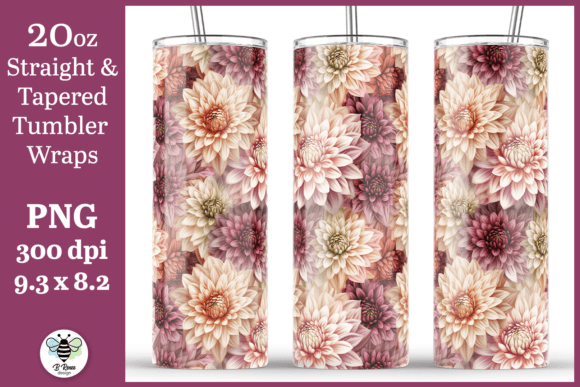
Consider the scenario of a small business owner launching a new holiday collection. Instead of ordering physical samples of every single design to photograph—a costly and time-consuming process—they can apply their digital artwork to this mockup. Within minutes, they have a professional-grade video showing the "Merry Christmas" design on one side and the matching pattern on the other. This speed allows for rapid testing of different designs. If a specific colorway isn't getting clicks, you can swap the design in the PSD and generate a new video in seconds, something impossible with traditional photography.
Real-World Applications Across Different Industries
The versatility of this tool extends far beyond just selling cups. Here is how different users can leverage this resource in practical settings:
- E-commerce Store Owners: Use the generated videos as the primary media on product pages. Customers feel more confident buying when they can see the product in motion, reducing return rates caused by "it didn't look like the picture" complaints.
- Social Media Managers: Create engaging content for Stories and Reels. You can overlay text promotions like "Flash Sale" or "New Drop" directly over the spinning tumbler video to drive urgency.
- Graphic Designers: Enhance your portfolio. Instead of showing a flat JPEG of your tumbler wrap, embed the animated GIF or MP4 on your Behance or personal website to show clients exactly how the final product will appear in real life.
- Educators and Course Creators: If you teach print-on-demand strategies, use these mockups in your course materials to demonstrate professional presentation techniques without needing expensive camera equipment.
- Bloggers and Affiliate Marketers: Embed these lightweight videos in blog reviews. A spinning product keeps readers on the page longer than a static image, improving dwell time and SEO metrics.
Technical Considerations Before You Start
While the benefits are clear, there are important technical details to consider before downloading or purchasing this type of asset. First and foremost, this is a Photoshop-only mockup. It will not work on Canva, mobile apps, or tablet versions of Photoshop. The animation process relies on desktop-level processing power and the full suite of Photoshop tools, specifically the Timeline panel and Smart Objects. If your workflow is entirely mobile-based, this tool will not fit your needs.
Additionally, because this method avoids the heavy 3D engine, it is generally faster to render. However, users should still be prepared to export their files correctly. The included ZIP file usually contains the main PSD and often a link to a video tutorial. It is highly recommended to watch this tutorial first. Understanding how to replace the smart object layer and adjust the timeline duration ensures you don't end up with a choppy video or a distorted design. The file dimensions (2500 px x 1736 px) are optimized for high-quality web display, but remember that you can easily resize the final export to fit specific platform requirements, such as the vertical 9:16 ratio for TikTok or the square 1:1 ratio for Instagram posts.
Future-Proofing Your Creative Workflow
One of the most significant advantages of choosing a non-3D dependent mockup is longevity. Many designers have faced frustration when updating Photoshop only to find their old 3D mockups no longer render correctly or require tedious re-work. By utilizing a method based on standard layer manipulation and frame animation, you ensure that your template remains functional regardless of software updates. This stability is crucial for businesses that rely on consistent branding over years.
Furthermore, the ease of customization means you can adapt to trends quickly. Did a client suddenly want to see their logo on a matte black tumbler instead of glossy white? With a well-structured PSD, you can often adjust blending modes or hue/saturation layers to simulate different finishes without needing a completely new file. This flexibility saves money and reduces the clutter of having hundreds of different mockup files on your hard drive.
Ultimately, the goal is to present your work in the best possible light. An Animated 20oz Skinny Tumbler Mockup provides a bridge between a digital concept and a tangible reality. It allows entrepreneurs to validate ideas, marketers to create compelling ads, and designers to showcase their skills with professionalism. By focusing on a tool that is both technically robust and creatively flexible, you position yourself to succeed in a visual-first digital landscape. Whether you are listing a single item on Etsy or running a large-scale ad campaign, the ability to quickly produce high-quality animated visuals is an invaluable asset in your creative toolkit.